Appendix
Printing Label Function
The label files (*.slex) created using SII Layout Editor can be printed using the SII SLP800 Series Web SDK.
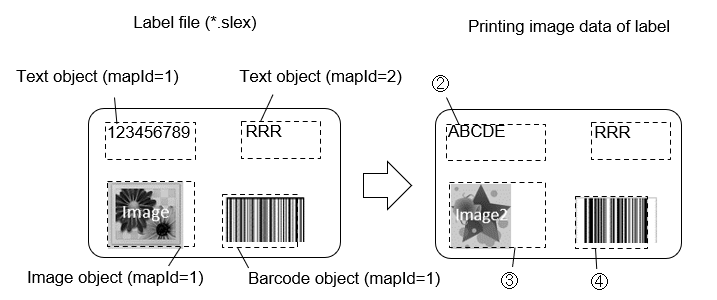
It also provides the function to replace text data, image data, or barcode data using the label file and print.
SII Layout Editor is software that can create label. Hereinafter referred to as the "app".
The app is available in the store.
Getting App
iOS or Android
By scanning a QR code below with the smartphone, redirected to the store and the app can be installed.
-
iOS

-
Android

Windows
By clicking on the URL below or inputting it into a web browser to go to the store, the app can be installed.
https://www.microsoft.com/store/apps/9P5G2R1PS76W
Note
- "SII Layout Editor" can also be searched and installed in App Store, Google Play, or Microsoft Store.
Structure of Label File
The label file is the file where objects are mapped within the print area for the label.
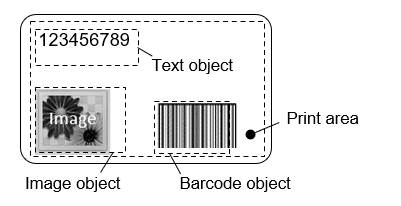
Example of label file (*.slex)
(1) Precautions for printing the label file using the SII SLP800 Series Web SDK
Printing the label file using the app may differ from printing the label file using the SII SLP800 Series Web SDK. Verify the performance with your actual device in advance.
Note the following when printing label files using the SII SLP800 Series Web SDK.
- All object
- The drawing object mapped outside the print area is not supported.
- Text object
- The "Serialization" is not supported.
- Barcode object
- Among the barcodes supported by the app, the following barcodes are supported by the SII SLP800 Series Web SDK.
- CODE39
- CODE128
- UPC-A
- EAN13
- CODABAR
- UPC-E
- EAN8
- PDF417
- Data Matrix
- QR Code
- The "Serialization" is not supported.
- The ratio of bar width setting is not reflected.
- The barcode image created using the app and the barcode image created by the SII SLP800 Series Web SDK may not become the same barcode image.
- If the height of the barcode object is specified to be lower than the bar height using the app, the barcode will be reduced to fit within the object in the SII SLP800 Series Web SDK and printed.
- When the security of the PDF417 is set to "-1" using the app, it is fixed to "0" in the SII SLP800 Series Web SDK and the object is drawn.
- Among the barcodes supported by the app, the following barcodes are supported by the SII SLP800 Series Web SDK.
- Drawing object
- When "Line Width" is too thin, dashed, long dashed, or double lines may be squished.
- The drawing position of the drawing object may differ between the app and the SII SLP800 Series Web SDK.
Method for using label file
The printing method using the label file is described below.
(1) Print the label file as it is from the SII SLP800 Series Web SDK
- Print command example
- ① Specify label file
- ② Add label file to buffer
- ③ Print the buffered data by sending it to the printer
(2) Replace the object data in the label file and prints
- Print command example
- ① Specify label file
- ② Replace text data of label (text object mapId=1)
- ③ Replace image data of label (image object mapId=1)
- ④ Replace barcode data of label (barcode object mapId=1)
- ⑤ Append label file to buffer
- ⑥ Print the buffered data by sending it to the printer