Command Definition File
A command definition file is a text file (*.txt) that describes transmission data in a predefined format and is saved in ANSI format and UNICODE format.
Format
The command definition file format is as follows:
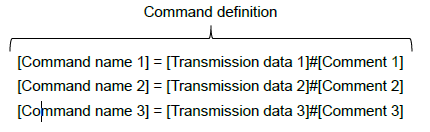
| Name | Description |
|---|---|
| Command name | Describe an arbitrary command name to be specified by DirectSendRead.
|
| Transmission data Transmission data |
Describe printer commands and data to send to the printer.
|
| Comment | Describe the command definition etc.
|
Examples of command definition:
CmdName_1=01#Request printer status.
CmdName_2=0C 10#Mark feed and get checkpoint response.
注意
- Data in command name unit described according to the format. Be sure to describe it on 1 line for 1 command definition.
参考
- The maximum size of a command definition file is 4 GB.
- The number of registerable command definitions depends on the available memory of the system.
How to Use
How to use the command definition file is described.
- Create a command definition file.
- Register the command definition file in the SDK internal memory by SendDataFile.
- Specifying the command name by DirectSendRead executes the contents of the transmission data.
注意
- The registered command definition is discarded by CloseMonPrinter.
- When a new command definition file is registered after registering the command definition file, the already registered command definition is overwritten.