How to Use Library
Describes the development environment of Android application and how to use the library.
Development Environment
In order to develop Android applications, the following tools are required.
• Android Studio
https://developer.android.com/studio/index.html
The description is on the premise that the environment where each tool is available is prepared.
Provided Files
The file configuration of the SII SLP800 Series Print Class Library is as follows.
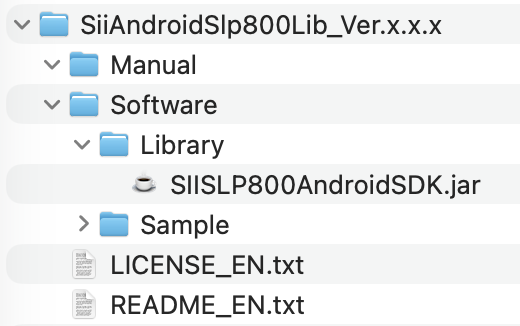
The file format of the library is JAR. The file name of the library is SIISLP800AndroidSDK.jar.
Build Library into Android Project
1. Launch Android Studio and open the target project.
2. Copy the library file SIISLP800AndroidSDK.jar into the libs folder.
If the libs folder does not exist, create it manually.
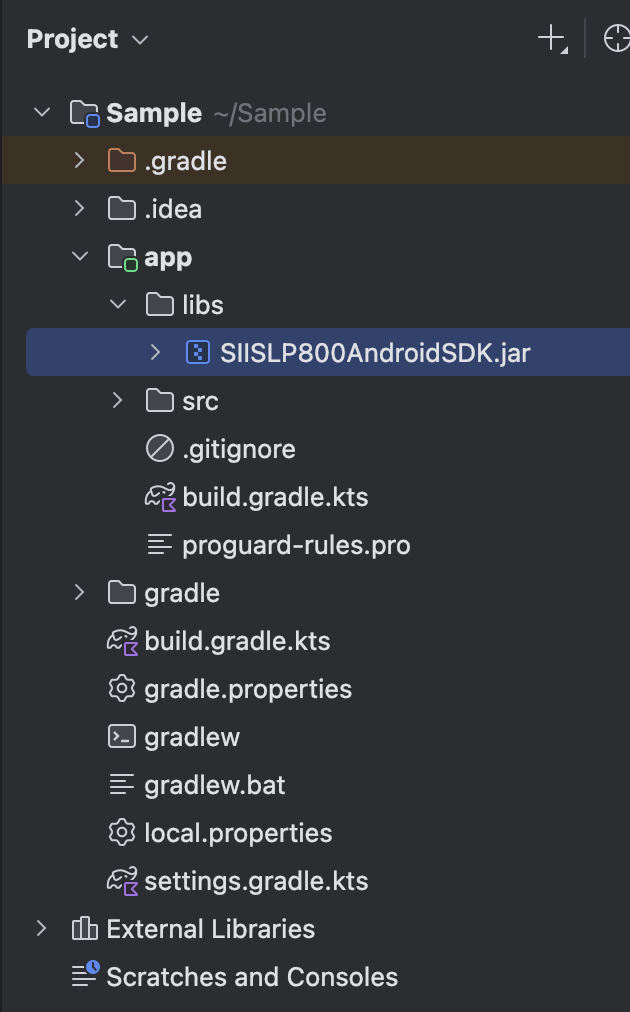
3. Add the following lines inside the dependencies {} block of your build.gradle(:app) file:
implementation("com.google.zxing:core:3.4.1")
implementation("com.journeyapps:zxing-android-embedded:4.3.0@aar")
implementation(files("libs/SIISLP800AndroidSDK.jar"))
4. At the beginning of the class file where you want to use the library, add the following imports:
import com.seikoinstruments.sdk.labelprinter.SIISLP800DiscoveryEvent;
import com.seikoinstruments.sdk.labelprinter.SIISLP800DiscoveryListener;
import com.seikoinstruments.sdk.labelprinter.SIISLP800DiscoveryManager;
import com.seikoinstruments.sdk.labelprinter.SIISLP800Printer;
import com.seikoinstruments.sdk.labelprinter.SIISLP800PrinterException;
import com.seikoinstruments.sdk.labelprinter.SIISLP800PrinterManager;
import com.seikoinstruments.sdk.labelprinter.SIISLP800PrinterStatusListener;
import com.seikoinstruments.sdk.labelprinter.SIISLP800SmartLabelManager;
5. Add the following permission declarations to your application manifest (AndroidManifest.xml).
Also, make sure to implement the appropriate permission request process (requestPermissions()) in your application.
When using Bluetooth:
<uses-permission android:name="android.permission.ACCESS_FINE_LOCATION"/>
<uses-permission android:name="android.permission.ACCESS_COARSE_LOCATION"/>
<uses-permission android:name="android.permission.BLUETOOTH"/>
<uses-permission android:name="android.permission.BLUETOOTH_ADMIN"/>
<uses-permission android:name="android.permission.BLUETOOTH_CONNECT"/>
<uses-permission android:name="android.permission.BLUETOOTH_SCAN"/>
At this point, the library’s functionality is available for use.